Monitor Memo Boards for Visual Thinkers: Fit-First Picks
By Diego Martins • 23rd Feb
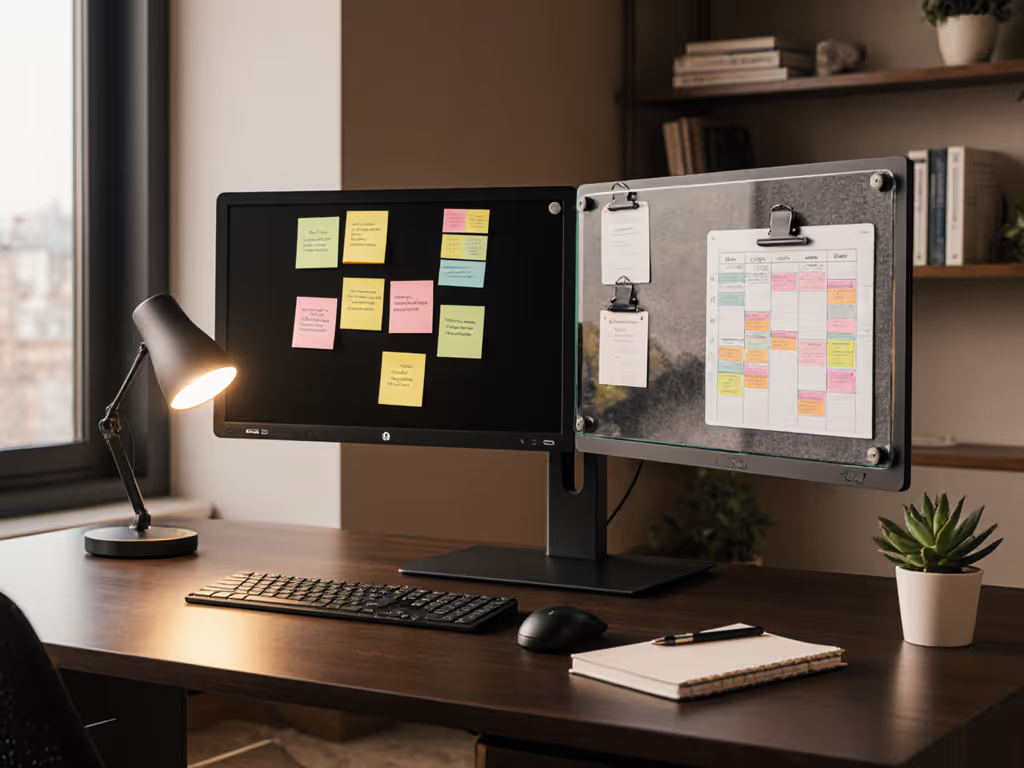
If you spend your day juggling sticky notes scattered across your monitor bezel, you already know that a monitor memo board and visual workspace organization aren't luxuries; they're lifelines. For visual thinkers, the workspace is the tool. Your brain processes space, sight lines, and arrangement differently; you don't just read a to-do list, you see it. But here's where most buyers go wrong: they chase the cheapest acrylic panel or magnetic whiteboard without verifying it actually fits their monitor frame, sits flush against their clamp or arm, or survives the adhesive removal that leaves their screen scarred. If your memo board needs to clear a riser or arm, compare options in our monitor stand vs shelf riser guide.
I've been there. Years ago, I installed a sit-stand desk clamp that promised universal mounting until I measured the crossbar. Off by 3 millimeters. That lesson taught me that value equals fit, lifespan, and modularity (not just sale price). In this review, I'm stress-testing five monitor memo boards against your actual needs: tolerance notes, upgrade-path logic, return-risk ratings, and real-world installation friction. I'll flag which setups scale if you add a second monitor and which ones trap you in adhesive-only purgatory.
1. Magnetic Computer Monitor Memo Whiteboard ($25-$30 price bracket)
Core fit advantage: Magnetic mounting avoids adhesive damage entirely. For renters or anyone paranoid about screen surface degradation, this is the lowest-risk category.
This reusable whiteboard memo board uses dual-track mounting: powerful rare-earth magnets plus 3M adhesive strips on the metal backing. The writing surface mimics paper texture, and it comes with a 0.5 mm fine-tip marker. The felt eraser is designed to survive thousands of wipes, which means your board stays fresh for years (critical if you're the type who scribbles daily reminders, sketches ideas, or maps project phases).
Tolerance notes: The magnetic design clips securely to aluminum monitor frames, but here's the catch: it only works if your monitor has a metal bezel. Older plastic-frame displays or ultra-thin no-bezel designs won't grip magnets. Before checkout, confirm your monitor frame material. Most modern 27" and larger monitors use metal, but ultrawide and gaming panels vary.
Performance reality: Users report occasional ink faintness and minor staining after erasing, which suggests the writing film degrades slightly over time. If you're writing dense notes daily, expect a 12-18 month window before the tactile "paper feel" softens.
Return-risk rating: Low. Magnets are non-destructive, and the product attaches/detaches in seconds. If it doesn't match your workflow, no surface damage on removal.
Upgrade-path flag: This scales well to dual monitors. Buy a second board and apply to the other monitor's frame. Unlike adhesive-only boards, you're not locked into a single install.
2. Transparent Acrylic Monitor Memo Board (Budget tier, ~$7-$15)
Core fit advantage: Minimal bulk, low weight, invisible overlay, perfect if your monitor visibility matters (e.g., color-grading work, design reviews).
The transparent acrylic panel attaches via adhesive strip and measures roughly 28 × 8 cm (11 × 3 inches), a size engineered for side-mounting on standard 24-27 inch monitors. It's lightweight enough that even weak adhesive won't sag, and the transparency keeps your screen unobstructed. Many users appreciate this for dashboards, color reference displays, or multi-monitor setups where left-screen real estate is precious.
Tolerance notes: Acrylic sheets are dimensionally stable, but adhesive strength is the real variable. Most reviews cite poor re-positioning friction: once you place it, moving it risks leaving residue or tearing the adhesive strip. The recommendation to clean the monitor bezel with isopropyl alcohol before install is standard, but "standard" often gets skipped in real life, leading to adhesive failure within weeks. For step-by-step cleaning and adhesive-safe removal, see our desk maintenance guide.
Performance reality: Some users report the board is not entirely transparent; depending on the acrylic grade and lighting angle, it can cast a faint haze or reflection. For precision work (photography, video, design), this minor obstruction might be visible during color-critical tasks.
Return-risk rating: Medium. Once applied, it's difficult to reposition without damage. If you discover poor fit, say it interferes with a monitor stand or arm, removal may leave sticky residue on your screen.
Upgrade-path flag: Low modularity. If you shift from a single 27" to a dual-monitor setup, you'll likely need different dimensions on the second monitor, and you can't reuse an acrylic board from monitor A on monitor B without adhesive replacement.
3. Transparent Acrylic Monitor Memo Board with Phone Holder ($12-$20 price bracket)
Core fit advantage: Dual-purpose design squeezes phone access into the same footprint, reducing desk clutter and cable routing complexity. The grooved holder at the board's base cradles a phone at a glance-able angle.
This variant addresses a real pain point: your phone sits on your desk (consuming space) or in a drawer (unreachable). By integrating a phone slot into the memo board, you reclaim ~8 inches of horizontal desk surface. The set typically includes two boards (left and right sides), so you can mount matching organizers on both monitor flanks. Each measures 28 × 8 cm, and the phone holder accommodates most phones at a stable 15-20 degrees tilt.
Tolerance notes: The integrated phone clip adds weight and shifts the center of gravity toward the top of the board. If adhesive is weak or partially applied, the board may sag over weeks, a risk amplified on narrow-frame monitors (under 0.5" bezel). The manufacturer recommends not attaching directly to edgeless screens; use on the stand frame or crossbar instead. For ultrawide monitors with thin side bezels, this becomes a critical constraint.
Performance reality: Strong adhesion is the double-edged sword here. Reviewers praise the stickiness but warn that repositioning risks monitor surface damage, especially on matte-finish bezels. One user reported that even after cleaning the frame with alcohol, the board wouldn't adhere firmly on their narrow-frame gaming monitor.
Return-risk rating: Medium-High. The phone holder's weight and the aggressive adhesion create misalignment risks on certain monitor geometries. If it doesn't fit your specific frame width or if the phone slot interferes with your keyboard angle, removal and re-placement are friction-heavy.
Upgrade-path flag: Moderate modularity. The phone holder is integrated, so it's useful in a single or dual-monitor setup (two boards, two phones). But if you add a third monitor or migrate to an ultrawide, the holder footprint may not scale.
4. Four-Piece Acrylic Monitor Message Board Set (Multi-monitor focus, $15-$25 price bracket)
Core fit advantage: Four boards instead of two mean you can outfit two monitors or use spares as you scale. This is the modular play for visual thinkers planning to expand.
This set includes left and right panels for two monitors, each with a groove at the base for holding a phone or small objects. The acrylic is lightweight and durable, and reviewers consistently note that it won't break during transport. The adhesive is formulated to remove without leaving sticky residue (a claim you should verify on your monitor finish before full commitment).
Tolerance notes: Two boards per side (so four total) suggests the maker expects you to use this across dual-monitor or single-monitor-with-spares scenarios. The groove design is simple but effective; unlike the integrated phone holder in option 3, the groove is shallow, so it holds a slim phone but can't prop a bulky case or tablet. Measure your phone depth and cross-reference with product dimensions before checkout.
Performance reality: Video reviews show the boards attached securely with no visible movement or shake, a strong sign of adequate adhesive. Users also note that the acrylic won't easily scratch or crack during install, which reduces return friction. However, durability beyond the first 12 months isn't well-documented, so longevity assumptions should be cautious.
Return-risk rating: Low-Medium. Four boards give you redundancy; if one doesn't adhere well, you have spares to test different positions or surfaces (monitor stand, desk edge, cabinet). Adhesive removal is reportedly clean, lowering the risk of surface damage.
Upgrade-path flag: High modularity. This set is built for scaling. If you move from a single 27" to a 27" + 32" dual setup, you've already got two extra boards waiting. The simplicity of the design means it's likely compatible across monitor sizes, a rare feature in this category.
5. Monitor Document Paper & Note Holder (Clip-based, $8-$15 price bracket)
Core fit advantage: Clips instead of adhesive mean zero surface risk. Ideal for users with borrowed monitors, thin bezels, or damage-anxiety.
This holder is a departure from memo boards; it's a clamp-style organizer that grips the top or side of your monitor frame (or even a laptop bezel) without adhesive. It holds loose papers, photos, business cards, or sticky notes in a secure grip. For visual thinkers who rely on physical reference documents, design comps, print drafts, research notes, this replaces the need to tape pages to your monitor.
Tolerance notes: Clip strength depends on monitor bezel thickness and frame material. A flat metal frame grips securely; a curved plastic bezel may slip. The clamp is adjustable, but range is typically 0.3 to 0.6 inches thickness. If your monitor has an ultrathin bezel (about 0.2 inches) or a curved design, the holder may not tighten enough. Check your monitor specs before ordering.
Performance reality: Users report reliable grip on standard monitor bezels, though occasional slipping on older curved plastic frames. The holder doesn't store items permanently; it's meant for active reference (a sketch you're eyeballing while coding, a design brief you're checking) rather than long-term reminder storage.
Return-risk rating: Very Low. Clip-based mounting is reversible and non-destructive. If it doesn't work for your desk geometry, no adhesive residue, no magnets to worry about.
Upgrade-path flag: Moderate. The holder is monitor-agnostic, so it works on your 27" now and your ultrawide tomorrow. However, if you add a side memo board later (acrylic or magnetic), the clip holder's footprint might compete for the same real estate on narrow bezels.
Fit-Per-Dollar Comparison Matrix
| Product | Price bracket | Installation risk | Surface damage risk | Modularity (dual/multi-monitor) | Longevity | Best for |
|---|---|---|---|---|---|---|
| Magnetic Whiteboard | $25-$30 | Lowest (magnetic) | None | High | 12-18 mo. | Daily note rotation, renters |
| Basic Transparent Acrylic | $7-$15 | Low | Medium (adhesive residue) | Low | 18-24 mo. | Single monitors, set-and-forget |
| Acrylic + Phone Holder | $12-$20 | Medium | Medium-High (weight risk) | Moderate | 18-24 mo. | Phone access, narrow dual setups |
| Four-Piece Set | $15-$25 | Low | Low | High | 18-24 mo. | Scaling from 1→2 monitors |
| Clip-based Document Holder | $8-$15 | Very Low | None | Moderate | 24+ mo. | Reference document storage, renters |
The Upgrade Path That Actually Works
Here's where most buyers stumble: they buy a single memo board, then six months later realize they need a second monitor and another board, but the original is no longer in stock, the adhesive formula changed, or the new version doesn't match. Visual thinkers are especially vulnerable because you've already planned your space in your mind.
If you're in a single-monitor setup now but suspect you'll add an ultrawide or second 27" within 12 months, start with the four-piece set. You'll use two boards immediately and have two spares for the day you expand. If you're a renter or anxious about surface damage, the magnetic whiteboard is the only adhesive-free option that also scales. Buy one, buy a second when you upgrade. If you're purely focused on reference documents and daily sketches, the clip-based holder is the longest-lasting, most flexible choice because it's monitor-agnostic.
Avoid buying the single-board options (basic acrylic or phone-holder variant) if you suspect future scaling. Adhesive boards don't mix well with each other across time or across different monitor sizes.
Installation Reality Check
Memo boards are simple, but installation friction is underrated. Here's what actually happens:
Adhesive-based boards: You'll spend 10 minutes cleaning the monitor bezel with isopropyl alcohol (most people skip this, causing adhesion failure). Then you'll position the board, second-guess the placement, and move it three times before committing. Once committed, repositioning is friction-heavy, so if your keyboard or monitor arm is slightly off, you're stuck. If you ever need to remove it, adhesive residue is a real risk on matte finishes.
Magnetic boards: Attach in 30 seconds, reposition instantly. But first confirm your monitor has a metal frame. Failure to verify this is the #1 return trigger.
Clip-based holders: Attach to almost anything, but clamp tension varies. You might need to tighten it weekly as the frame shifts or the material fatigues. This is the most "active" mount in the category.
Before you decide, ask: Will I need to reposition this in 6 months? If yes, avoid permanent adhesive. Will I swap monitors? If yes, prioritize clip or magnetic designs.
Critical Clearance Check (Signature Diego Rule)
I've learned this the hard way: measure your monitor frame depth, your desk depth, and any monitor arms or crossbars before assuming fit. A 28 cm (11") acrylic board can collide with a monitor arm bracket, a keyboard tray, or a desk-mounted lamp if clearances are under 5 cm. Some ultra-compact desk setups have less than 3 cm of free space on either side of the monitor. If you're working with tight clearances, our compact workspace planning guide shows space-tested layouts that prevent collisions.
Check clearance before checkout. Request the exact dimensions of the board you're considering, then sketch your desk layout with measurements. If you have a monitor arm with a crossbar under 10 cm from the monitor base, a heavy acrylic board with phone holder may cause frame stress.
Summary and Final Verdict
Monitor memo boards are deceptively simple, but fit-per-dollar separates the keepers from the returns. For visual thinkers in small spaces planning to scale, the four-piece acrylic set ($15-$25) is the pragmatic entry. You get modularity, low adhesive risk (clean removal), and enough spares to experiment with placement. For renters or adhesive-averse users, the magnetic whiteboard ($25-$30) is the only zero-damage option that also rewrites (versus sticky-note annoyance). For document-heavy workflows, the clip-based holder ($8-$15) outlasts acrylic boards and works across monitor geometries.
Avoid single-board buys unless you're certain you'll never expand. Avoid phone-holder integrated variants unless your specific monitor frame width is under 0.6" and your phone case is slim. And before you order, measure your desk depth, monitor frame material, and planned monitor count over the next 18 months.
Value isn't the lowest price tag. It's the board that fits your desk, scales with your setup, and doesn't punish you with returns. Buy once, upgrade smart, avoid adhesive regret.
Related Articles